The Vision Cone and the Blind Half-Plane
Standing at the Front Puts Half the Room Behind You
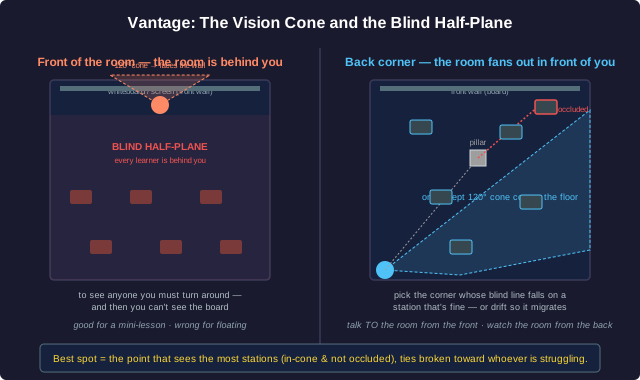
A person's useful field of view is roughly a cone: comfortable attention spans about 120° in front of you, and with a head-turn you can sweep close to 180°: but never the 180° behind you without turning around. Where you stand fixes which workstations fall inside that cone and which fall in your blind half-plane.
Front of the room (the lecture spot): you face the wall, the screen, the board. Every learner is behind you. Your 120° cone covers the whiteboard and a doorway; the thirty people doing the work are in the blind half-plane. To see any of them you have to turn around: which means you cannot see them and your visual aid at the same time. This is the shepherd's geometry: facing the gate, the flock at your back.
Back or corner of the room (the captain's spot): you face into the room. From a back corner of a rectangular room, the whole floor fans out in front of you: every workstation can fall inside a single sweep of your cone. You see who is heads-down, who is slumped, who has a hand half-raised, who is talking. This is the captain's geometry: facing the crew.
Occlusion is the other half of the problem. A pillar, a tall monitor, a bookshelf, a clump of learners: any solid object between you and a workstation occludes it: the line of sight is blocked, so that station is invisible no matter which way you face. The best standing spot is the one that maximizes the number of stations that are simultaneously (a) inside your vision cone and (b) not occluded by anything. If one corner leaves a station hidden behind a pillar, the right move may be a different corner, or a slow drift that trades one blind spot for another over the course of a work block: so that no station stays hidden for long.
A quick model. Put workstations as points on the floor and the facilitator as a point with a 120° cone they can rotate. A station is 'seen' if it is within line of sight (no occluder on the segment between) and the cone can be rotated to include it. The facilitator's job in choosing a spot is a small optimization: pick the point on the floor from which the most stations are seeable, breaking ties toward the point that also keeps the currently struggling stations closest.
Choosing the Standing Spot
A studio is a rectangular room, 8 m by 6 m. There are six workstations: four along the two long walls (two on each side) and two in the middle of the room, back to back. There is a structural pillar roughly in the centre, between the two middle workstations and the front wall. The teacher tends to deliver a 5-minute mini-lesson from the front wall when needed, then floats.
Circuit Period and Worst-Case Wait
Workstations Are Nodes; Your Walk Is a Closed Tour
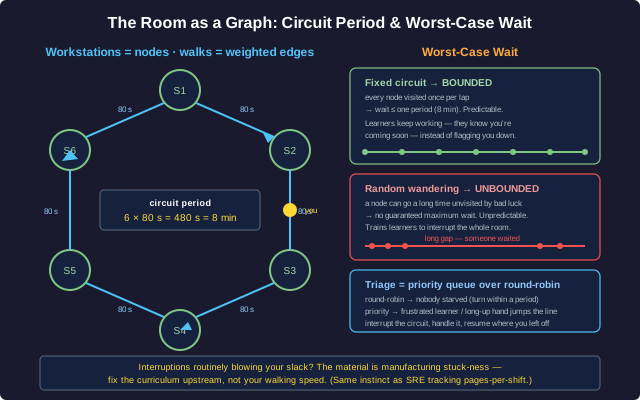
Model the room as a graph: each workstation is a node, and the walkable path between two stations is an edge with a length measured in time to walk it. The facilitator floating among the learners is tracing a closed walk: a tour that visits every node and returns to start, then repeats. This is the classic watchman / patrolling problem: a guard walking a museum, a nurse doing rounds, an on-call engineer cycling through dashboards.
The key quantity is the worst-case wait. For any node, the wait is how long it goes between visits. On a fixed circuit, that wait is bounded by the circuit period: the total time to walk one full lap. Walk a lap in 8 minutes and no learner waits more than ~8 minutes for you to pass close by. Every learner can count on that: they keep working because they know you'll be there soon, instead of waving you down (which interrupts everyone) or sitting stuck in silence.
Why a fixed circuit beats random wandering. A random walk has an unbounded worst-case wait: by bad luck, a node can go a long time unvisited while you happen to keep circling the other side of the room. Random wandering also trains learners to flag you down, because they can't predict you. A predictable circuit converts 'when will the teacher get to me?' from an anxiety into a known quantity: and a known quantity is something a learner can plan around.
Triage rides on top of the base circuit. The plain circuit treats every node equally; real learners aren't equal at every moment. So you run the circuit as a default, and interrupt it for a high-priority node: a learner spiralling into frustration, a hand that's been up a while: then resume the circuit where you left off. Formally, it's a priority queue layered over a round-robin: round-robin guarantees nobody is starved (everybody gets a turn within one period), priority lets the urgent jump the line. Drop the round-robin and the quiet stuck learner never gets reached; drop the priority and the frustrated learner spirals while you finish your lap. You need both.
A tiny calculation. Six stations roughly in a loop, ~80 seconds of walking between neighbours including the pause to glance: one lap ≈ 6 × 80 s = 480 s = 8 minutes. So the base worst-case wait is 8 minutes. If one interruption costs you ~2 minutes off the circuit, the worst-case wait that lap stretches to ~10 minutes: still bounded, still predictable. If interruptions are eating half your time, that's a signal: the material is generating too much stuck-ness, and the fix is upstream in the curriculum, not in your walking speed.
Designing the Route
A studio has eight workstations. Walking between adjacent stations (including a few seconds to glance at the screen) averages 45 seconds. The teacher wants every learner to be passed close by at least once every 6 minutes under normal conditions, with a little slack for the occasional interruption.
Two Weak Signals Make One Confident Fix
You Can't Watch Eight People Continuously: So You Triangulate
A facilitator floating among eight learners cannot stare at all eight at once. Instead you sample signals, each one weak and ambiguous on its own:
- Posture: slumped, head in hands, leaning back arms-crossed, or hunched forward and tense. (But someone leaning back might just be thinking.)
- Screen / page state: frozen on the same step for twelve minutes, an error message, a blank answer box, a half-typed sentence deleted three times. (But someone might be reading carefully.)
- Time-on-task: the step timer, or just your memory: 'they've been on that one a long time.' (But long isn't always stuck: some steps should take a while.)
- Sound: a sigh, an 'ugh', a pen tapping, a chair scraping back. (But a sigh might be relief.)
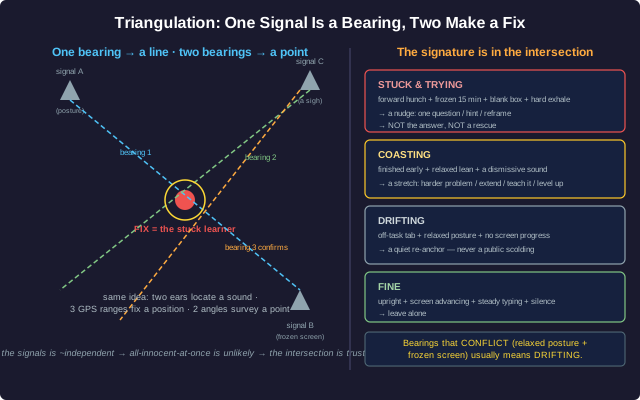
Any one signal is a bearing, not a fix. In navigation, one bearing to a landmark tells you you're somewhere along a line: a ray of possible positions. You can't pin your location with one bearing. Take a second bearing to a different landmark and the two lines intersect at a point: now you have a fix. Same with a sound: one ear gives you a vague sense; two ears, comparing the tiny difference in arrival time, let your brain triangulate the direction. Same with GPS: one satellite's range puts you on a sphere; you need three or four ranges intersecting to fix a position. Same with surveying: two known angles from two known points locate the third point exactly.
So you combine signals. Slumped posture alone: maybe they're tired. Frozen screen alone: maybe they're reading. But slumped posture and a screen frozen on the same step for twelve minutes and a sigh: three weak bearings intersecting on one learner: is a confident fix: that's a stuck learner, go there. The combination is far more reliable than any single signal, because the noise in the signals is largely independent: it's unlikely that three unrelated innocent explanations all happen at once. Two bearings beat one; three beat two.
And it tells you what kind of need. Frozen screen + tense forward hunch + a deleted-three-times answer = stuck and trying: they need a nudge, not a rescue. Finished-early + leaning back + scrolling = coasting: they need a stretch. Off-task tab + relaxed posture + no screen progress for a while = drifting: they need a quiet re-anchor. The signature is in the intersection of the bearings, not in any one of them.
Locating the Need
On one pass of the room you register these scraps:
- Learner P: leaning back, arms crossed, looking at the ceiling. Screen shows a completed module summary. You heard a faint 'pfft' a minute ago.
- Learner Q: hunched forward, screen frozen on the same problem you saw them on at the start of the block (~15 min ago), answer box blank, just exhaled hard.
- Learner R: upright, typing steadily, screen advancing, no sound.
Proxemic Zones and the Learner's Line of Sight
Too Far Is No Help; Too Close Takes Over
How close you stand changes the interaction, and the distances are roughly the proxemic zones anthropologists describe:
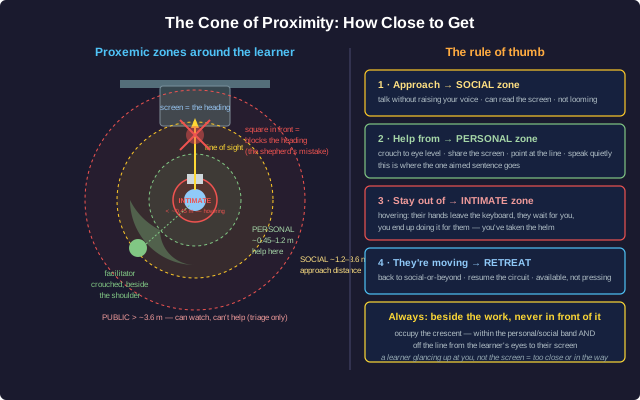
- Public zone (beyond ~3.6 m): you can see the room but not a learner's screen, and you'd have to raise your voice to talk: fine for watching, useless for helping. From here you can triage which station, not what's wrong.
- Social zone (~1.2-3.6 m): conversational range without raising your voice; you can read the screen; the learner can keep working while you talk. This is the approach distance: close enough to engage, far enough not to loom.
- Personal zone (~0.45-1.2 m): the working distance for actually helping: you can both see the same screen, point at the same line, talk quietly. Crouch to their eye level here so you're not towering. This is where the one-aimed-sentence intervention happens.
- Intimate zone (under ~0.45 m): too close: now you're hovering. The learner stops working and waits for you; their hands come off the keyboard; you end up reaching in and doing it for them. Crowd the screen and you've taken the helm out of their hands. Back off to the personal zone the moment the nudge has landed.
The rule of thumb: approach to the social zone, drop to the personal zone to help, never to the intimate zone, and retreat to social-or-beyond the instant they're moving again. Available, not looming. Present, not pressing.
The other constraint: don't block the destination. A learner faces their work: that's their heading. Picture the line of sight from the learner's eyes to their screen. Your job is to occupy the space outside that line: beside them, or slightly behind their shoulder, angled so you face them and their screen, while they still face their work unobstructed. Stand square in front of their monitor and you've literally put yourself between the learner and their destination: the shepherd's mistake again, in miniature. The captain stands where the crew can still see where they're going. So does the facilitator: beside the work, never in front of it.
Putting it together: the cone of proximity. From the learner's seat, sweep out the zone that is (a) within the personal-to-social distance band and (b) not on the line between their eyes and their screen. That crescent: beside and slightly behind the shoulder: is where the facilitator belongs during a one-on-one. Close enough to share the screen and speak softly; far enough that the learner's hands stay on the work; off to the side so their view of their own heading stays clear.
Positioning for a One-on-One
You've triangulated that Learner Q is stuck and trying, and you're going over to give the nudge. Q is at a desk facing a monitor against the wall.
Facilitation Geometry: Summary
What You Have Learned
A floating teacher is solving geometry problems all day:
- Vantage. Your field of view is a ~120° cone (~180° with a head-turn): never the 180° behind you. Face the front and the room is in your blind half-plane; stand in a back corner and it fans out in front of you. Occluders (pillars, tall monitors) block the line of sight to whatever sits behind them: pick the spot whose blind line falls on a station that's fine, or drift so the blind spot keeps moving.
- The sweep. The room is a graph: workstations are nodes, walks between them are weighted edges. Your circuit is a closed tour; its period is the bounded worst-case wait. A fixed circuit caps everyone's wait at one period; random wandering has an unbounded worst case and trains learners to flag you down. Triage is a priority queue over a round-robin: round-robin against starvation, priority for urgency. Routine slack-blowing is a curriculum signal, not a walking-speed problem.
- Triangulation. You can't watch everyone, so you sample weak signals: posture, screen state, time-on-task, sound. One signal is a bearing, not a fix; two or three independent bearings intersect on one learner and on one kind of need (stuck / coasting / drifting). The combination is reliable because the signals' errors are roughly independent: several innocent explanations rarely coincide.
- Proximity. Distance is an instrument. Approach to the social zone (~1.2-3.6 m), help from the personal zone (~0.45-1.2 m, crouched to eye level), stay out of the intimate zone (under ~0.45 m: hovering takes the helm), retreat to social-or-beyond once they're moving. Stand beside or behind the shoulder, outside the line of sight from the learner's eyes to their work: never square in front of the screen, which puts you between the learner and their heading.
Every one of these is the same instinct the captain has standing at the stern: take the vantage point that sees the whole deck, walk a route that reaches everyone on a known schedule, read the crew from a distance and locate the one who needs you, and close in just enough to help without ever taking the wheel out of their hands. Facilitation is geometry. Stand where you can see, walk where you can reach, and get close: but not too close.