Reading the Long Tail
Latency Lives on a Curve, Not a Number
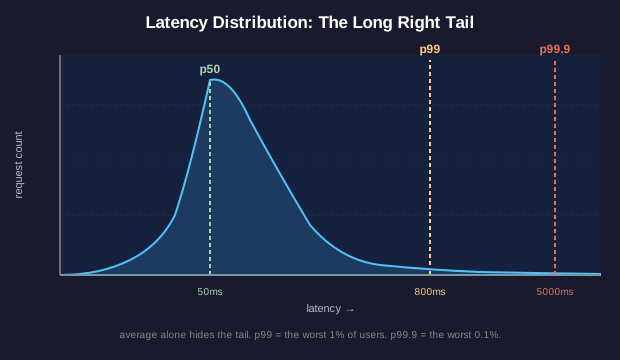
An average latency hides what users experience. Real services produce a distribution: a curve showing how many requests took how long.
Three points on that curve carry most of the operational meaning:
- p50 (median): the middle of the distribution. Half of requests finish faster, half slower. Describes the typical experience.
- p99: the 99th percentile. Only 1% of requests took longer than this. Describes the worst experience for typical users.
- p99.9: only 0.1% of requests took longer. Describes the worst experience for power users who hit the service often.
Geometric insight: latency distributions almost always have a long right tail. The curve rises quickly to a peak around the median, then falls slowly toward the right, often with a small bump far from the average. That bump represents the slowest users: the ones who write angry tickets.
Why averages mislead: a service with median 50 ms and p99 of 5,000 ms has a 100x gap between typical and tail experience. The arithmetic mean might land at 100 ms, hiding the catastrophe entirely. The arithmetic mean is a single point projection of a 2D shape: nearly all of the shape's information disappears.
The percentile multiplication problem: a request that touches 10 backend services, each with a p99 of 100 ms, has a p99 of roughly 600 ms (not 100 ms). The slow tails multiply. This is why the SRE book warns: 'beware the slowest of N'. As N grows, your tail latency degrades quickly.
Tail Latency Math
Service A has a request flow that fans out to 5 backend services in parallel and waits for all responses. Each backend has a p99 latency of 100 ms.
Budget Depletion as Slope
Plotting the Budget Over Time
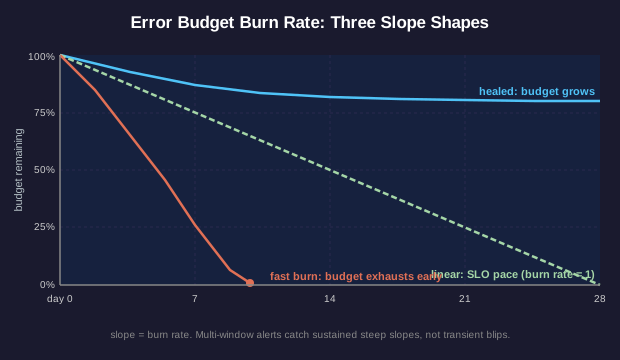
An error budget plotted on 2D axes (time on x, budget remaining on y) reveals service health at a glance. The shape of the depletion curve carries the same information ten dashboards would convey individually.
Three reference shapes:
- Healthy linear depletion: the budget falls in a straight line proportional to elapsed time. By day 14 of a 28-day window, half the budget should remain. This is the SLO target made visible.
- Fast burn: a steep slope downward. Indicates an active reliability problem. If the slope is steep enough, the budget exhausts before the window resets, triggering the error budget policy.
- Healed curve: a flat or rising segment. The service is performing better than its SLO. Budget remaining grows over time, opening room for risky launches.
Burn rate is the slope of the depletion line, normalized: a burn rate of 1 means burning the budget exactly as fast as time passes (perfectly aligned with SLO). A burn rate of 10 means burning 10x faster than allowed: the entire monthly budget would deplete in 2.8 days at this rate.
Multi-window multi-burn-rate alerting: Google's SRE workbook recommends alerting on combined conditions like 'burn rate above 14.4 over the last hour AND above 14.4 over the last 5 minutes'. The geometry: a sustained steep slope, not just a brief spike. This shape filters out transient blips while catching real depletion threats.
Reading a Burn Rate
Your team's SLO is 99.9% over 28 days. At day 7, you have already used 60% of your error budget. The current burn rate over the past 24 hours is 8.
Services as a Directed Graph
Production as a DAG
Modern services run as a graph of dependencies. Each service is a node. Each call from service A to service B is a directed edge from A to B. The full picture forms a directed graph (sometimes a DAG, sometimes with cycles via async retries).
Critical geometric properties:
- Out-degree: how many services a node depends on. Higher out-degree means more upstream failure modes. A service that depends on 12 backends fails if any one of those 12 fails.
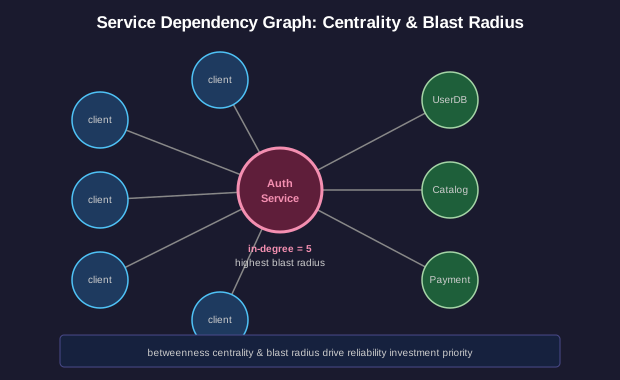
- In-degree (fan-in): how many services depend on this node. Higher in-degree means a single failure here cascades widely. A database with 30 dependent services has the largest blast radius.
- Betweenness centrality: how many shortest paths pass through a node. High-betweenness nodes are the choke points. Authentication services and core APIs typically score high.
- Strongly connected components: groups of services that form cycles. If A calls B and B calls A, you have a cycle. Cycles complicate failure recovery: starting either service requires the other to already work.
Blast radius is the geometric concept that drives reliability investment. A failure's blast radius is the subgraph of dependent services it affects. Reliability engineering invests heavily in nodes with the largest blast radius. The cheapest way to improve overall system reliability is often to add redundancy or graceful degradation at the highest-betweenness nodes.
Blast Radius Reasoning
A consumer service depends on: AuthService, UserDB, ProductCatalog, PaymentGateway, RecommendationEngine, EmailService, AnalyticsService. AuthService has 47 other services depending on it. EmailService has 3 other services depending on it. RecommendationEngine has 2 other services depending on it.
Information Geometry of a Dashboard
Pixels Are Real Estate
A dashboard is a 2D surface with finite area. Every pixel allocated to one signal is a pixel not allocated to another. Dashboard design is a geometry problem: arrange the most decision-relevant information within the smallest visual area while preserving spatial relationships that aid recognition.
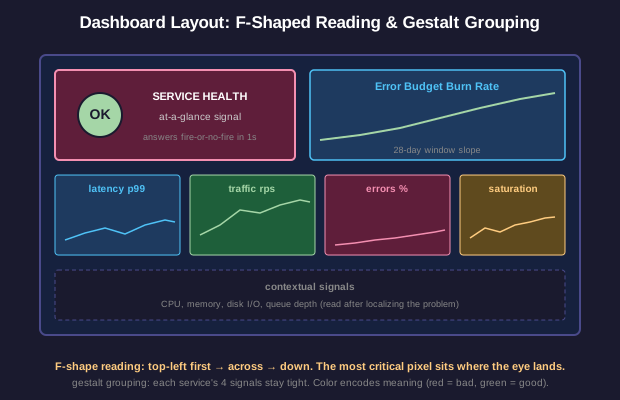
Reading patterns: Western readers scan F-shaped (top-left first, then across, then down). The most important signal belongs in the top-left. The bottom-right gets the least attention.
Gestalt grouping: signals from the same service belong in the same visual group. Latency, traffic, errors, and saturation for one service belong in a 2x2 grid, not scattered across the screen. Visual proximity encodes logical relationship.
Color encoding: red for errors, yellow for saturation, green for healthy ranges. Color choices are conventions, not random. Inverting them costs cognitive load on every glance during incidents.
Y-axis scaling: a graph scaled 0-100% looks calm even during a doubling of traffic. A graph auto-scaled to recent values looks alarming during normal variation. Both choices have appropriate uses; the choice is geometric, not cosmetic.
Information density: too few signals leave the team blind to what's wrong. Too many bury the signal in noise. Edward Tufte's data-ink ratio applies: maximize the ratio of ink that conveys information to ink that decorates. Sparkline-style minimalism beats cluttered widgets at a glance.
Designing for First Glance
Your team is designing a single primary dashboard for a service that has 8 critical SLIs across 4 backend dependencies. The dashboard must answer the on-call engineer's first question at 3 AM in under 5 seconds: 'is something on fire, & if so, where?'
Geometry of SRE: Wrapping Up
Shapes That Run Production
You have walked through four geometric structures that run beneath SRE practice:
- Latency distributions as long-tail curves where percentile points carry more truth than averages
- Error budget cones where the slope of depletion reveals service health better than the remaining number
- Service dependency graphs where blast radius and centrality direct reliability investment
- Dashboard layouts as 2D real estate where pixel allocation is a geometry problem with operational consequences
Geometric thinking is what separates SRE from generic operations work. An ops engineer reads numbers. An SRE reads shapes. The shapes encode information that no single number can capture: the slope of a burn rate, the fatness of a tail, the centrality of a node, the gestalt of a dashboard panel.
The companion lesson on SRE itself covered the practices. This lesson covered the geometry beneath them. Together they form the visual and conceptual scaffolding of modern reliability engineering.